Giving an AI Agent Live Store Context: Inventory, Cart and Webhooks

- Why an AI Shopping Agent Needs Live Store Context
- Shopify Theme App Extensions: Inside the Store, Not on Top of It
- Real-Time Cart Sync During the Conversation
- Webhooks: Keeping Inventory and Orders Current
- PostgreSQL and Vector Search for Recommendations
- What Store Context Gives Merchants
- An Agent Is Only as Good as What It Knows
How Totebot gives its AI shopping agent live store context: Shopify theme app extensions, real-time cart sync, webhooks and PostgreSQL vector search.
An AI shopping agent that recommends a jacket that sold out last week is worse than no agent at all.
It sounds helpful. It is confident. And it sends the shopper to a page where they can't buy anything. Do that twice and they stop trusting the chat, and often the store.
Most AI chatbots on online stores have this problem. They sit on top of the website as a generic overlay, trained on a product export or a few pages of text, with no idea what is in stock right now or what the shopper already has in their cart.
When we built Totebot, our own AI shopping agent platform, store context was one of the main problems we set out to solve. This post is about how Totebot keeps its agent connected to the live store.
Why an AI Shopping Agent Needs Live Store Context
A good salesperson in a physical shop knows three things without thinking: what is on the shelves, what is in your basket, and what goes well with it. An AI agent needs the same.
Inventory decides what it can recommend. A recommendation is only useful if the shopper can buy it. The agent has to know what is available, at what price, in which variants.
The cart decides what it should say next. A shopper with a pair of hiking boots in their cart needs different help from one who just arrived. The agent should know what is already there and be able to change it.
Product relationships decide what to suggest. Accessories, compatible parts and alternatives are where an agent can help most, and where generic chatbots fail.
All of it changes constantly. Prices change, stock runs out, new products arrive. A snapshot from last week is already wrong.
Totebot handles this with four connected pieces.

Shopify Theme App Extensions: Inside the Store, Not on Top of It
The first decision was where the agent lives. A script pasted into a theme is fragile. It breaks when the theme changes, and it asks merchants to touch code they would rather not.
Totebot uses Shopify's theme app extensions, the way Shopify intends apps to add elements to a storefront. Merchants add Totebot from the theme editor, with no code changes.
It feels native. The assistant appears as part of the store, not as a foreign widget bolted on. The experience is non-intrusive for shoppers and simple for merchants.
It runs in the shopper's real session. Because the assistant is part of the storefront, it works alongside the store's own pages, products and cart, not in a separate window that knows nothing about them.
It survives theme updates. Merchants change themes and edit layouts. An extension managed through Shopify's own system keeps working without someone fixing a broken script.
We built multiple specialised Shopify apps for Totebot. Beyond Shopify, merchants on WooCommerce can connect too, and any store can upload product data, descriptions, images and inventory directly.
Real-Time Cart Sync During the Conversation
Recommending a product is half the job. Getting it into the cart is the other half.
Totebot keeps the shopping cart synchronised in real time during the conversation. Shoppers can add or update items directly through the chat, and the store's cart reflects it straight away.
No copy and paste. A shopper who says "add the medium one" should not be sent off to find the product page, pick a size and come back. The agent does it in the conversation.
One cart, not two. What the agent sees and what the store shows are the same cart. If the shopper adds something from a product page, the agent knows. If the agent adds something, the cart icon updates.
Context for the next answer. With the cart in view, the agent can suggest what fits with it, flag what is missing for a complete order, or answer "will these arrive together?" without asking the shopper to repeat themselves.
This is where an agent stops being a search box with a personality and starts guiding shoppers from search to checkout.
Webhooks: Keeping Inventory and Orders Current
The agent needs to know about changes the moment they happen, not the next time someone runs an export.
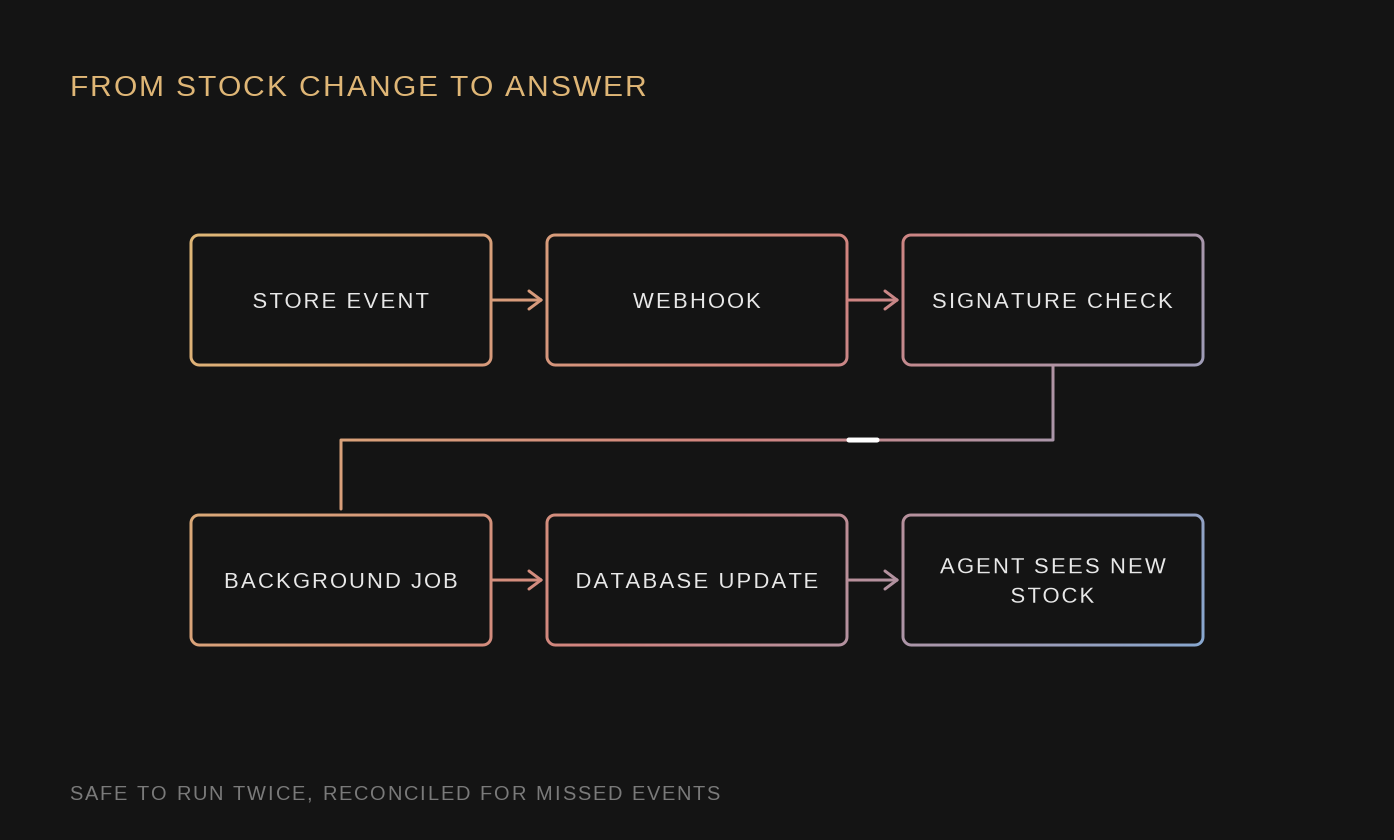
Totebot uses webhooks to receive instant updates on orders, inventory and product changes. When stock changes or a product is edited, the store tells Totebot, and the agent's view of the catalogue updates.
Respond fast, process later. A webhook endpoint should accept the event and get out of the way. Totebot hands the actual work to background jobs on BullMQ and Redis, so a burst of updates, like a big product import, does not slow anything down.
Assume duplicates and odd ordering. Shopify does not guarantee that webhooks arrive in order, and the same event can arrive more than once. A product update can show up before the product's creation. Handlers have to be safe to run twice and smart about which version of the data is newest.
Don't rely on webhooks alone. Events can be missed. Shopify itself recommends periodic reconciliation, fetching recent changes directly, so the catalogue heals itself if something slipped through.
Verify every delivery. Each webhook is signed. Anything that changes what the agent tells shoppers has to come from the store, not from whoever found the endpoint.
PostgreSQL and Vector Search for Recommendations
Shoppers don't search the way catalogues are organised. They ask for "something warm for hiking in the rain" or "a part that fits my older model". Keyword search finds the words. It does not find the meaning.
Totebot stores product data in PostgreSQL with vector search. Products and knowledge base content are stored as embeddings, numeric representations of meaning, next to the normal relational data.
Meaning finds the candidates. Vector search matches the shopper's question to products that fit what they mean, even when none of the words match.
Relational data keeps it honest. Because the embeddings live in the same database as inventory, prices and product relationships, the agent can combine "what matches" with "what is actually available" instead of stitching two systems together.
One database, fewer moving parts. Keeping semantic search inside PostgreSQL means one source of truth to back up, secure and keep in sync. The webhooks update one place, and the agent reads from one place.
The result is an agent that recommends available and relevant products, not the closest text match in a stale export.
What Store Context Gives Merchants
Live context is not a technical nicety. It changes what an AI agent can do for a store.
Fewer dead ends. Shoppers are not sent to products they can't buy.
Shorter paths to checkout. Finding, comparing and adding to cart happen in one conversation.
Better upsells. Suggestions built on product relationships and the current cart are the ones shoppers actually take.
Answers merchants can trust. Every conversation is logged in the Totebot dashboard, so store owners can see what the agent recommended and why, and improve the knowledge base where it falls short.
If you are weighing whether to build something like this or buy an off-the-shelf tool, our build vs buy framework is a good place to start, and our AI solutions page covers how we work.
An Agent Is Only as Good as What It Knows
The model is the part everyone talks about. In practice, the model is rarely what makes a shopping agent useful. Context is.
An agent that knows the shelves, the basket and what goes together can sell. One that doesn't is a polite way to send shoppers to sold-out pages. Totebot is built around that difference, and it is the first thing we look at in any AI product that has to act on real data.