Streaming Replies in Conversational AI: Why Real-Time Changes the Experience

Why streaming replies matter in conversational AI, and how Totebot uses Server-Sent Events and smart buffering to keep shopping conversations fast and natural.
Ask a person a question and they start answering almost straight away. Ask most AI products a question and you stare at a spinner until the whole answer is ready.
That pause is longer than it looks. A language model writes its answer one piece at a time, and a long reply can take many seconds to finish. If the product waits for the last word before showing the first, the shopper sits in silence the entire time.
In a conversation, silence reads as broken. People retype the question, refresh the page or leave.
We hit this early with Totebot, our own AI shopping agent platform for e-commerce. This post is about how Totebot streams its replies, and why the details around streaming matter as much as the streaming itself.
Why Waiting for a Full AI Answer Breaks the Conversation
A shopping assistant is not a search box. It is a conversation, and conversations have rhythm.
The first words matter most. Once text starts appearing, people read along and the wait stops feeling like a wait. What hurts is the gap between pressing send and seeing anything at all.
Long answers are the useful ones. Comparing two products, explaining sizing or walking through a return is exactly where an assistant earns its place. Those are also the answers that take longest to generate. Without streaming, the most helpful replies feel the slowest.
Shoppers don't wait. On a store, the alternative to waiting is one click away. A blank chat window for several seconds is a good way to lose a sale the assistant was about to help with.
So when we designed Totebot, we treated slow request and response as one of the core technical problems to solve, alongside provider lock-in and chatbots that ignore e-commerce context.

How Totebot Streams a Reply
The idea is simple: show the answer as it is written. Getting it right across thousands of conversations is where the work is.
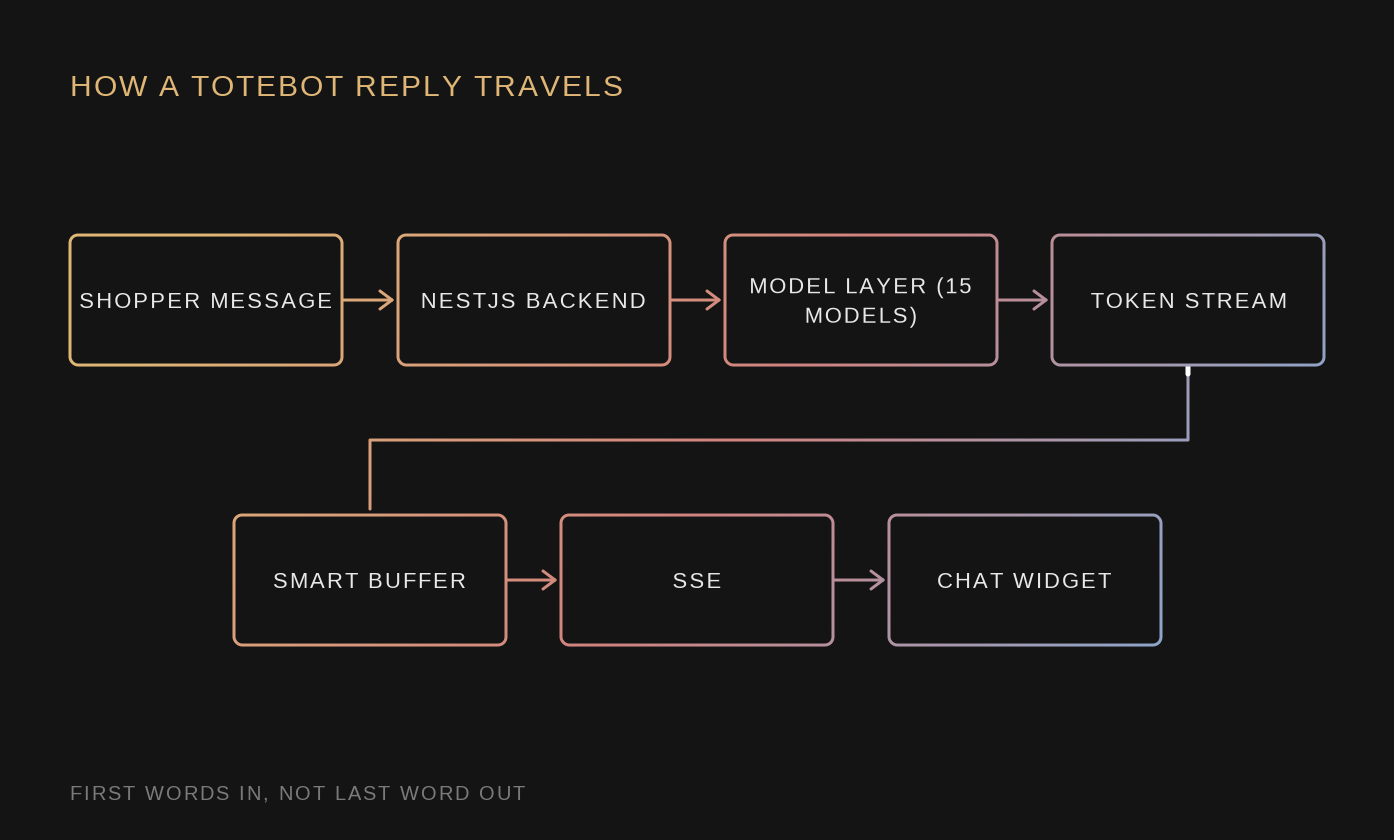
The message goes to our backend. Totebot's backend is built on NestJS and TypeScript. It loads what the assistant needs to answer: the store's knowledge base, the conversation so far and the product context.
The model layer picks the model. Totebot sits on an abstraction layer over 15 models from OpenAI, Anthropic and Google. Each provider streams its output in its own format. The abstraction layer turns all of them into one internal stream, so everything after this point works the same whichever model the merchant picked.
Tokens go through a buffer. Raw model output arrives in small, uneven pieces. Before anything reaches the shopper, it passes through what we call smart buffering, which shapes the stream into readable chunks. More on this below.
Server-Sent Events carry it to the shopper. The chat widget receives the reply over Server-Sent Events (SSE) and renders each chunk as it arrives.
Live updates run beside it. Socket.IO handles the real-time communication around the conversation, and BullMQ with Redis takes background jobs off the main path, so the reply stream never waits on work that can happen later.
Why We Chose Server-Sent Events
There are several ways to push data from a server to a browser. For streaming an AI reply, Server-Sent Events fit best.
It is plain HTTP. An SSE response is an ordinary HTTP response that stays open and sends text as it becomes available. It passes through the same load balancers, proxies and authentication as the rest of the API. There is no separate protocol to run and secure.
It matches the shape of the problem. A reply flows one way: from the server to the shopper. The shopper's next message is a new request. SSE is built for exactly that, a one-way stream of events, so we don't carry the weight of a two-way channel for a one-way job.
Browsers already understand it. Server-sent events have native browser support, including reconnecting after a dropped connection. On a shaky mobile connection in a store's checkout flow, that matters.
It is the pattern people already know. Shoppers have used chat tools that write their answers live. A reply that appears word by word feels familiar, and familiar feels fast.
SSE has its own traps. Proxies and compression can hold back a response until it is "big enough", which quietly turns a stream back into a wait. Idle connections get closed by infrastructure that thinks nothing is happening. A streaming system has to account for every layer between the model and the screen, not only the code that sends the events.
Smart Buffering: Readable Chunks, Not Raw Tokens
Streaming raw tokens straight to the screen is technically real-time and still a poor experience. Tokens are fragments of words. They arrive in bursts, then pause, then burst again. Rendered one by one, the text stutters.
Buffering turns fragments into reading units. Totebot's smart buffering splits longer answers into readable chunks. The shopper sees words and sentences appear at a steady pace, not half-words flickering in.
Structure has to arrive whole. A shopping reply is not only prose. It has lists, links and product recommendations. Half a link or half a product suggestion is worse than no link at all, so a buffer has to know when a piece is complete enough to show.
Long answers become easier to read. A big block of text that keeps growing is tiring to follow. Splitting long answers into chunks helps shoppers take them in as the conversation goes on.
Every channel gets a consistent experience. Totebot does not only live on the website. The same assistant works across web, mobile and messaging channels like WhatsApp, Telegram and Messenger. Each channel shows messages differently, and buffering is what keeps replies readable on all of them.
The point is simple. Real-time is not about pushing bytes as soon as they exist. It is about the shopper reading a natural reply as soon as possible.
Streaming at Scale: Thousands of Open Conversations
A normal API request is short. It comes in, gets an answer and closes. A streamed reply keeps a connection open for as long as the model is writing. Multiply that by every shopper chatting at once across many stores, and connections become something you have to manage.
Connection management is a feature. Totebot supports thousands of concurrent conversations, with connection management and load handling built in. Connections that drop, shoppers who close the tab mid-answer and slow mobile clients are all normal cases, not exceptions.
Stop work nobody is waiting for. When a shopper leaves halfway through a reply, the rest of that reply has no reader. Detecting closed connections keeps resources for the conversations that are still live.
Keep slow work off the stream. Logging, analytics and the sentiment analysis store owners see in the dashboard all matter, but none of them should delay the next sentence. Background jobs handle them after the fact.
Provider choice helps here too. Because Totebot can switch between models and providers, merchants are not tied to the speed or availability of a single one. The streaming layer does not care which model is behind it.
What We Learned Building It
Measure what the shopper feels. Total response time is the wrong number to stare at. The time until the first readable words appear is what decides whether the conversation feels alive.
Test the whole path, not the endpoint. A stream that works on a laptop can arrive in one lump in production because a layer in between buffers it. We verify streaming end to end, through the same infrastructure shoppers use.
Design for interruptions. People change their mind mid-answer, lose signal or switch apps. A streaming system that only works on perfect connections does not work.
Streaming is part of the product, not plumbing. It shapes how the assistant feels more than almost any prompt change. We treat it with the same care as the answers themselves.
If you are thinking about adding AI to your product, our AI solutions page covers how we approach it, and why AI projects fail covers what usually goes wrong before streaming is even a question.
A Conversation Should Feel Like One
Good answers are not enough if they arrive after the shopper has given up. The moment someone presses send, the clock starts, and every layer between the model and the screen either helps or gets in the way.
Streaming with Server-Sent Events, buffering that respects how people read, and a backend built for thousands of open connections are what make Totebot feel like a conversation instead of a form. That is the bar for any conversational AI we build.