What People Are Using to Run Coding Agents

What people are using to run coding agents: the harness that runs one agent, the tools that run many in parallel, and why more code is not more shipped software.
A year ago, the question was which AI coding assistant to use. Now it is how many agents to run at once, and where.
The tools have changed fast, and the names change even faster. But underneath, the setups people use have settled into two layers: the thing that runs one agent, and the things that run and coordinate several.
This post maps both layers, names the tools people actually use, and ends with the part that matters most for anyone paying for software: more code does not automatically mean more shipped product.
Two Layers: the Harness and Everything Around It
The harness runs one agent. It is the program that connects a model to your code. It reads files, runs commands, edits code, runs tests and asks for permission when it should. When people say "I use Claude Code" or "I use Codex", they mean a harness.
The layer around it runs many. Once one agent works well, people want five. That brings new problems the harness was not built for: agents editing the same files, terminals to keep track of, laptops that have to stay open, and a pile of pull requests at the end of the day.
Most of the interesting change over the past year has happened in the second layer.

The Harness Layer: Tools That Run One Coding Agent
These are the agents developers talk to directly.
Claude Code from Anthropic runs in the terminal, in editors, in a desktop app and on the web. It is the harness we use most.
Codex CLI from OpenAI is an open-source agent that runs locally in the terminal, alongside OpenAI's cloud version of Codex.
Cursor started as an AI code editor and now has its own agent, both inside the editor and as a command-line tool.
GitHub Copilot offers an agent mode in the editor, on top of the code completion most developers already know.
Gemini CLI from Google, and open-source harnesses like OpenCode and Aider, round out the list. Several of them can work with models from more than one provider.
Under the hood, they look more alike every month. Each reads the repository, plans, edits, runs commands and checks its own work. The differences are in the model behind them, the permission model, the interface and the price. Picking one matters less than people think. What you do around it matters more.
Running Several Agents in Parallel
The moment you run a second agent on the same project, two problems appear. Agents overwrite each other's changes, and you lose track of what each one is doing. The tools in this layer solve one or both.
Terminal multiplexers
tmux and Zellij are old tools that suddenly matter again. They let one terminal window hold many sessions, and keep those sessions running after you disconnect. Many developers simply run one agent per pane and switch between them. It is cheap, flexible and requires nothing new, but it does nothing to stop agents from editing the same files.
Worktree managers
A git worktree is a second checkout of the same repository, on its own branch, in its own folder. One agent per worktree means no agent can overwrite another's work. It is the single most useful rule for running agents in parallel.
Managing worktrees by hand gets tedious, so tools appeared to do it. Claude Code can start a session in its own worktree. Claude Squad is an open-source terminal app that combines tmux and worktrees to manage several agents, including Claude Code, Codex and Aider. Conductor is a Mac app that runs Claude Code and Codex agents in parallel, each in its own worktree, with diffs and pull requests in one place.
Cloud background agents
The newest option takes agents off the laptop entirely. You hand over a task, the agent works in its own cloud environment, and you come back to a branch or a pull request.
Claude Code on the web runs sessions on Anthropic's infrastructure, several at once, and keeps going when you close the browser. Codex runs tasks in the background, in parallel, in its own cloud environment. Cursor's Cloud Agents, formerly Background Agents, run each task on its own virtual machine. GitHub's Copilot coding agent takes an issue assigned to it and opens a draft pull request for review.
The pattern is the same everywhere. One task, one isolated environment, one branch, one pull request. Whichever tools people choose, the setups that work converge on that shape.
What Actually Changes When You Run Agents in Parallel
Running agents in parallel moves the bottleneck. Writing code stops being the slow part. Three other things take its place.
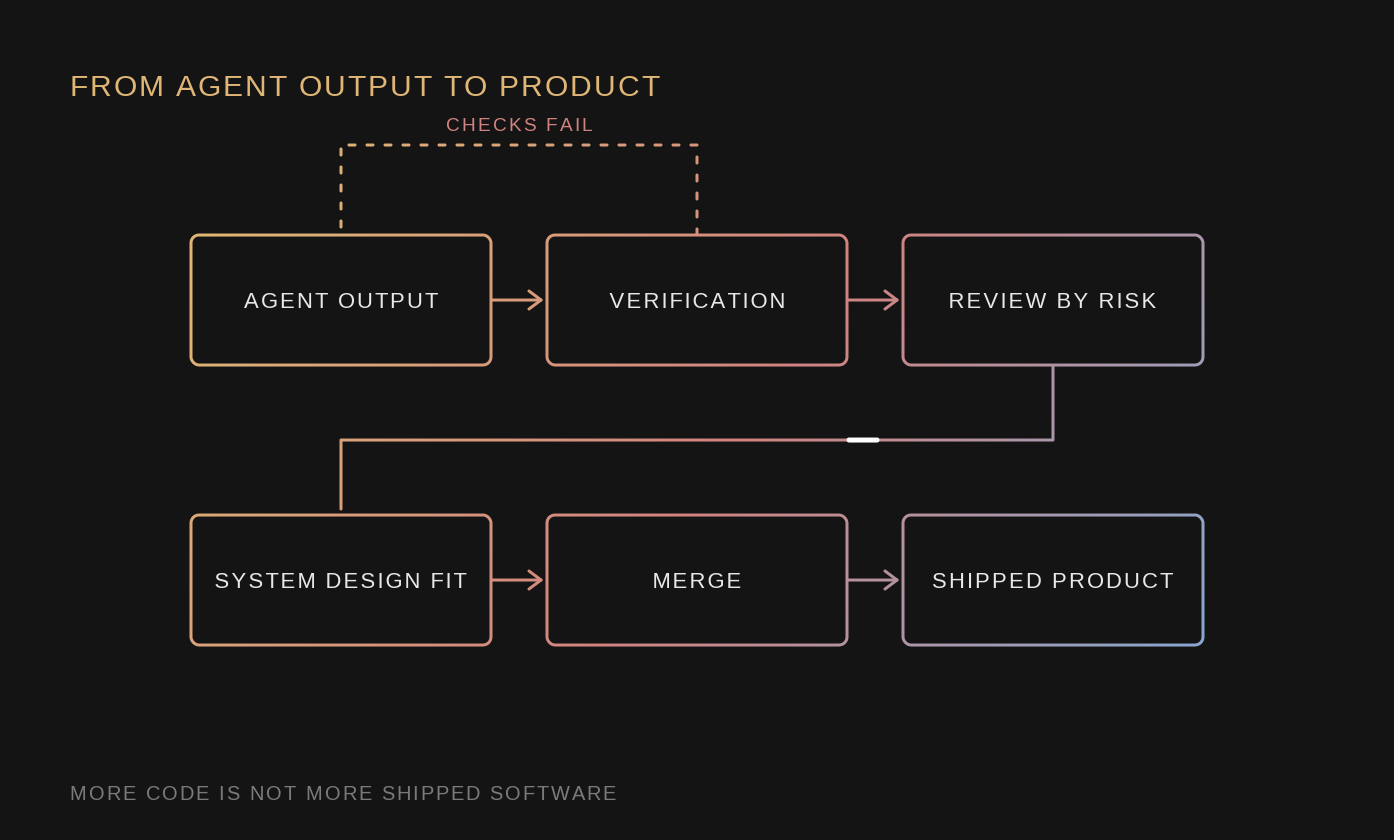
Verification. An agent saying "done" means nothing on its own. Every change needs checks that prove it works: tests for what changed, a build that runs, and ideally a look at the real result. Without them, five agents produce five times the bugs.
Review. Someone has to decide what merges. Reading every line does not scale, so the question becomes which changes a person must read and which can be trusted to automated checks. Money, authentication, data and infrastructure always need a human.
System design. Agents copy what they see. In a clean, consistent codebase, they do the right thing. In a messy one, they copy the mess, faster than any team could. The structure of the system is now the most important input an engineer controls.
None of these come with the harness or the orchestration tool. They are the part you have to build yourself.
More Code Is Not More Shipped Software
This is the point that matters for anyone buying software.
It is now easy to generate a lot of code. Teams can show impressive numbers: pull requests per day, lines written, agents running overnight. None of those numbers is the product. A feature that is half-verified, a pull request nobody understood and a codebase that grows faster than anyone can reason about all count as output. None of them count as shipped.
Code is cheap. Correct, maintainable software is not. The value moved from typing to deciding: what to build, how the pieces fit, and how you know they work.
The tools are available to everyone. Every team can install the same harness and the same worktree manager this afternoon. What separates teams is the system around the agents: the checks, the review rules and the architecture that keep the speed from turning into bugs.
Ask how, not how much. If a team tells you they use AI agents, the useful question is not how many. It is how they verify the output, who reviews what, and how they keep the codebase clean enough for the next change.
This is how we work. Agents do much of the writing. Our engineers spend their time on system design, on deciding where the risk is, and on the checks that prove every change works. We wrote about the shift in the new era of software creation, and about why the hard part of AI work is rarely the model in why AI projects fail.
The Tools Will Change. The Job Won't.
The names in this post will look different in a year. Some tools will merge, some will disappear, and the harnesses will keep borrowing each other's features.
The shape will hold. One agent per task, one isolated environment per agent, and a system around them that decides what reaches production. Teams that build that system ship. Teams that only add agents produce more code.
If you have a product to build and want the speed without the mess, let's talk.